Bias Mitigation
Load The Data
from sklearn.datasets import fetch_openml
from sklearn.model_selection import train_test_split

dataset = fetch_openml(name='adult', as_frame=True)
df, y = dataset.data, dataset.target

# Several of the columns are incorrectly labeled as category type in the original dataset
numeric_columns = ['age', 'capitalgain', 'capitalloss', 'hoursperweek']
for col in df.columns:
    if col in numeric_columns:
        df[col] = df[col].astype(int)


X_train, X_test, y_train, y_test = train_test_split(
    df, y.map({">50K": 1, "<=50K": 0}).astype(int), train_size=0.8, random_state=12345
)

X_train, X_val, y_train, y_val = train_test_split(
    X_train, y_train, train_size=0.75, random_state=12345
)

X_train.shape, X_test.shape
((25641, 14), (14653, 14))
Train a Model Using Scikit-learn
We train a simple sklearn random forest and then evaluate its performance and fairness.
from sklearn.pipeline import Pipeline
from sklearn.ensemble import RandomForestClassifier
from sklearn.preprocessing import OneHotEncoder

sklearn_model = Pipeline(
    steps=[
      ("preprocessor", OneHotEncoder(handle_unknown="ignore")),
      ("classifier", RandomForestClassifier()),
      ]
)
sklearn_model.fit(X_train, y_train)
We first need to initialize a ModelBiasMitigator. It requires a
fitted model (the base estimator), the name of the protected
attributes to use, a fairness metric, and an accuracy metric.
from guardian_ai.fairness.bias_mitigation import ModelBiasMitigator

bias_mitigated_model = ModelBiasMitigator(
    sklearn_model,
    protected_attribute_names="sex",
    fairness_metric="statistical_parity",
    accuracy_metric="balanced_accuracy",
)
The ModelBiasMitigator can be called with the usual scikit-learn interface,
notably being trained with a single call to fit.
bias_mitigated_model.fit(X_val, y_val)
The fitted model can then be used to collect probabilities and labels like any usual model.
bias_mitigated_model.predict_proba(X_test)
array([[0.88659542, 0.11340458],
    [0.2137189 , 0.7862811 ],
    [0.3629289 , 0.6370711 ],
    ...,
    [1.        , 0.        ],
    [0.73588553, 0.26411447],
    [1.        , 0.        ]])
bias_mitigated_model.predict(X_test)
array([0, 1, 1, ..., 0, 0, 0])
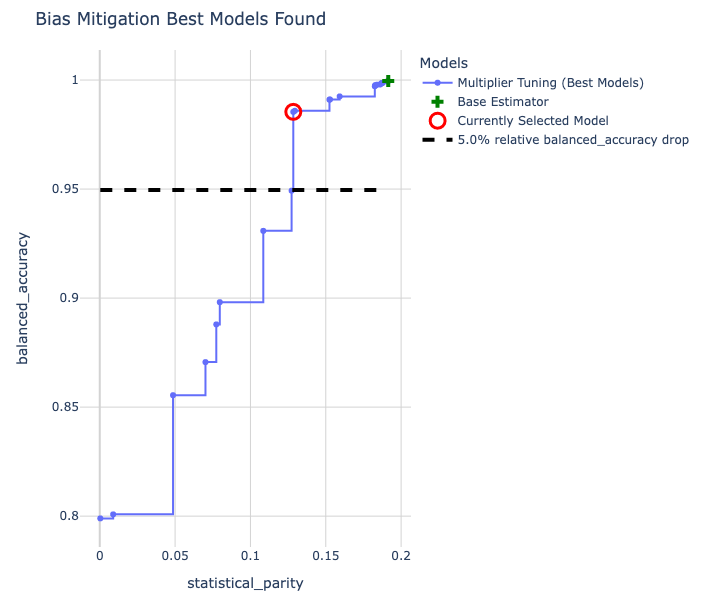
We can also visualize all of the best models that were found by our approach using a single show_tradeoff call.
bias_mitigated_model.show_tradeoff(hide_inadmissible=False)
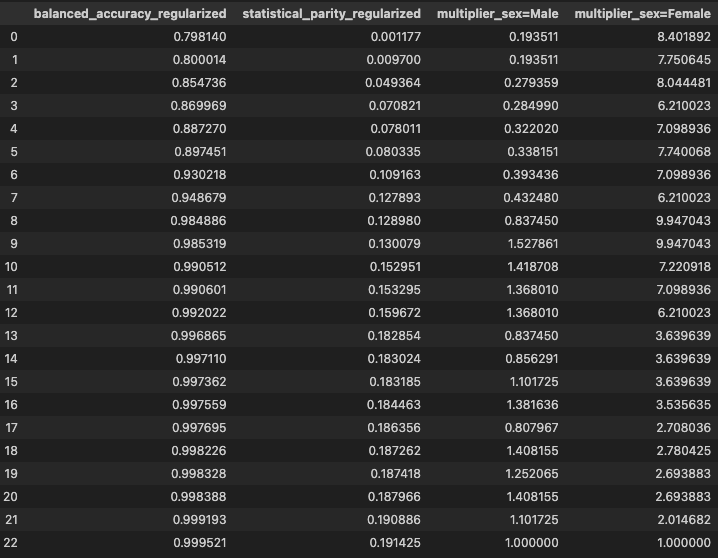
A summary of these models can be accessed as below.
bias_mitigated_model.tradeoff_summary_
By default, the best model retained and used for inference is the most fair within a 5% accuracy drop relative to the most accurate model found by our approach. It is highlighted in red in the above figure. Note how the base estimator without bias mitigation is dominated by a number of models available with bias mitigation. With little to no loss of accuracy score, we have a model that is much more fair!
If we prefer a model with a different fairness and accuracy tradeoff, we
can instead pick another model from the tradeoff plot above. The index
needed to select a model can be obtained by hovering over individual points in the plot.
We can also look up a model’s index in the tradeoff_summary_ DataFrame.
We can then select the model using the select_model method.
bias_mitigated_model.select_model(3)
We can run inference on with this model, just like the other one.
bias_mitigated_model.predict(X_test)
array([0, 1, 1, ..., 0, 0, 0])